Annealing is a heat-treatment process used to bring a metal to the right internal condition before the next manufacturing step or before final delivery. In aluminum coils, it is typically used to improve formability, reduce internal stresses, and make the final properties more consistent. The difficulty is that the furnace does not directly show what is happening inside the coil. This software predicts that internal thermal response before the furnace runs, so cycle decisions are based on the batch itself instead of guesswork.
What Annealing Is and Why It Matters
Annealing is a controlled heating and cooling process used to change the material condition in a predictable way. Depending on the product and alloy, the goal may be to soften the material, relieve residual stresses, improve ductility, prepare the coil for forming, or stabilize final properties.
For that to happen, the material has to experience the right temperature history for long enough. If the cycle is too weak, the coil may leave the furnace with poor or uneven properties. If it is too aggressive, the process wastes energy and can expose parts of the coil to more heat than necessary.
Why Annealing Cycles Go Wrong
A furnace controller follows air or chamber temperature. Metallurgical quality, however, depends on what happens inside the material. In aluminum coils, the outer layers heat first and the core can stay well behind for hours.
That is where the usual production problems come from. If soak time is too short, the core may never reach the required condition and the final properties can drift. If soak time is too long, energy is wasted and the outer layers can see more exposure than necessary. In mixed batches, one coil may be ready while another is still far from target, which creates uneven results across the charge.
Who This Software Is For
This tool is for process engineers, furnace engineers, plant managers, and technical teams responsible for heat-treatment quality, cycle time, and energy use. It is especially useful when batches include coils with different sizes, masses, or alloys, and when current recipes depend heavily on operator experience.
It is also meant for teams that need usable answers quickly. You do not need a simulation specialist building meshes and setting up a full FEM study every time a batch changes. The workflow is designed around furnace recipes, coil data, and production decisions that plant teams already work with.
What the Software Does
The software simulates transient temperature development for each coil in the batch before the furnace cycle starts. It predicts how the surface and core evolve over time under the selected furnace recipe, so you can see which coil is limiting the batch and whether any coil is at risk of overheating.
Instead of using furnace temperature alone as a proxy, the model turns the real batch definition into actionable outputs: core temperature curves, surface temperature curves, bottleneck identification, and pass or fail checks against process limits. That makes it easier to decide whether the current recipe is safe, too conservative, or not sufficient.
How the Software Works
The workflow follows the same logic as the real process: define the batch, define the furnace, set the recipe, and review the result.
Step 1: Set the Batch
Enter the coils in the charge and the key data for each one: inner diameter, outer diameter, width, mass, and alloy. These inputs define the real thermal load. A furnace with several small coils behaves very differently from one loaded with a few large, heavy coils.
Step 2: Furnace Setup
Set the furnace-side thermal conditions such as losses, convection, radiation, emissivity, and operating limits. This defines how the furnace transfers heat to the coils and how it behaves during the cycle.
Step 3: Furnace Recipe
Build the recipe with ramp, soak, and cooling stages. Because the cycle is simulated first, you can test shorter soaks, different ramps, or different setpoints before committing to a production run.
Step 4: Results
Review the result for each coil. You can compare core and surface temperature over time, identify the slowest coil in the batch, check overheating risk, and export the report for production or quality review.
Why Teams Use It Instead of Full FEM
A full FEM study can answer the same thermal question, but it is usually too heavy for day-to-day furnace decisions. It requires mesh setup, specialist knowledge, more time, and typically a more expensive software stack. That is not practical when recipes and batch composition change frequently.
This tool is built for production use. Once the model is set up for the process, engineers can run predictions directly from batch and furnace inputs without needing a dedicated simulation engineer for every case. The result is faster setup, lower analysis cost, and a workflow that fits plant reality instead of research workflow.
The goal is not to replace thermal physics with a shortcut. The goal is to package the physics in a way that production teams can actually use.
From Simulation Output to Process Decisions
The main production question is whether the core reached the required temperature and held it for long enough. The software answers that directly, which makes it easier to decide whether the current recipe is valid, too conservative, or still too short.
It also shows the opposite problem: surface overexposure. If the outside of the coil is spending too long at elevated temperature while the core is still catching up, that appears clearly in the result before the batch runs.
Validation Against Commercial FEM
The model was checked against a commercial FEM solver using the same coil geometry, material data, and furnace recipe. Both approaches solved the same transient heat-transfer case independently. The chart below shows how closely the two results match across the full annealing cycle.
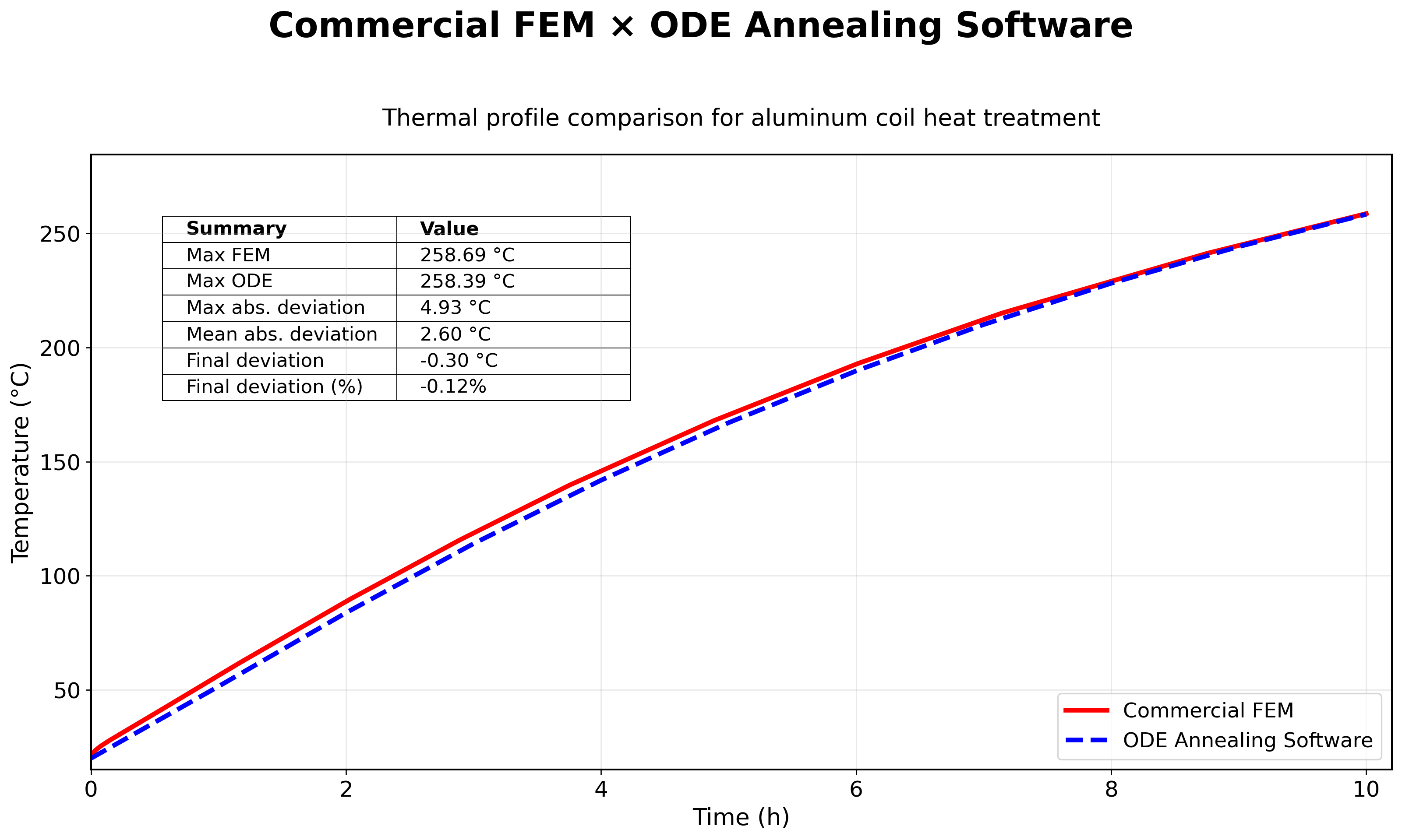
0.12 %
Max deviation
Peak difference between the in-house model and the FEM reference over the full cycle.
Full cycle
Ramp / Soak / Cool
Validation covers the transient ramp, the hold period, and the cooling segment, not just a steady-state snapshot.
No FEM needed
In production
After validation, the same prediction can be run without a commercial license, mesh setup, or FEM workflow.
Hover the interactive chart to compare the furnace recipe and the core temperature from both models at each time step.
Energy and Production Impact
When soak time has been padded to stay safe, predicting the core usually creates room to tighten the cycle. That means lower energy per tonne, fewer reruns, more stable final properties, and better furnace availability. On stable products, soak-time reductions in the 10 to 30 percent range are often realistic.
Frequently Asked Questions
Why does the furnace controller temperature not represent the coil core temperature?
Because the controller measures furnace conditions, not the temperature deep inside the coil. In large coils, heat moves from the outside toward the center, so the core can remain far behind the furnace setpoint for a long time.
What are the main inputs the simulation requires?
The core inputs are the batch definition, the furnace recipe, the coil material data, and the main heat-transfer settings. In practice that means coil dimensions and alloy, plus ramp, soak, cooling, losses, convection, and emissivity.
How does the simulation handle multiple coils with different dimensions in the same batch?
Each coil is solved with its own geometry and properties under the same furnace recipe. The output then shows which coil is limiting the batch and how the rest of the charge behaves.
Can the tool predict surface overheating, not just core underheating?
Yes. It predicts both surface and internal temperature over the full cycle, so it can flag surface overexposure as well as a core that is heating too slowly.
How is this different from the furnace's built-in temperature logging?
Logging tells you what the furnace did and what its sensors measured. This software estimates what happened inside each coil, which the furnace cannot measure directly.
What kind of energy savings are realistic with this approach?
That depends on how much safety margin is built into the current recipe. Where soak times have been padded heavily, reductions in the 10 to 30 percent range are often realistic.
See It In Action - Book a Live Demo
See how the simulation handles your furnace, your batch mix, and your cycle constraints in a 30-minute walkthrough.